

Quick Summary
The cheapest time to shape a home’s electrical system is before drywall, when you can add circuits, boxes, and cables with little effort. A larger panel with spare breaker spaces, a prewired EV circuit, and dedicated appliance lines prepare a home for rising power demand. Wired network runs, neutral wires at switches, and fan-rated boxes keep later smart upgrades simple. Surge protection, backup power planning, and a photographed walkthrough before insulation round out the essentials.
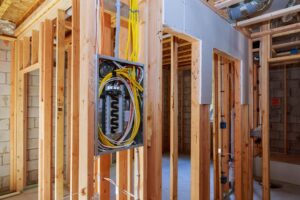
Walls stay open for a short window during new home construction, and that window is the most affordable time to finalize the wiring plan. Adding an outlet or running a cable after drywall goes up means cutting, patching, and painting.
A thoughtful new home construction electrical checklist helps homeowners catch missing circuits, awkward switch spots, and future needs before the framing disappears from view.
Why a New Home Construction Electrical Checklist Pays Off Before Drywall
Contractors work from standard plans, and those plans meet code but don’t necessarily match how a family lives. Homeowners who bring their own priorities to the table end up with a house that feels tailored from day one. Our team works with homeowners across Murrieta and Temecula, and we often hear the same regret. An outlet that would have cost little during framing now requires opening a finished wall.
Walking the plan with your contractor and electrician early sets expectations and reduces change orders. Homeowners can review new construction electrical services to see how these decisions come together during the framing stage.
1. Size the Electrical Panel for the Future
Standard plans often size the panel for today’s appliances. Electric vehicles, heat pumps, induction ranges, hot tubs, and solar panels can push demand well beyond that figure within a few years. Ask about a larger service and a panel with plenty of open breaker spaces.
Smart panels deserve a look too. A Leviton smart panel can let you monitor energy use by circuit and switch breakers off from an app. Features like these help manage loads as the household grows and its needs change.
2. Walk Through Outlet Placement Room by Room
Code sets minimum outlet spacing, and daily life usually asks for more. Picture routines in the spaces you use and mark outlets where they make sense:
- Kitchen: Plan outlets along the backsplash, on the island, and inside a pantry for small appliances.
- Bedrooms: Place outlets on both sides of where the bed will go, with a USB option for phones.
- Living room: Add a recessed outlet behind the television and consider a floor outlet near the sofa.
- Bathrooms: Put an outlet inside a vanity cabinet for an electric toothbrush or hair tools.
- Garage: Include outlets at workbench height and one near the ceiling for a door opener or storage lift.
- Exterior: Spread weather-resistant outlets around the patio, front porch, and side yard for holiday lights and power tools.
Mark furniture locations on the floor plan before the walkthrough. A sofa planned against a wall can easily block an outlet placed without that context.
3. Prewire the Garage for an EV Charger
Even without an electric car today, a 240 volt circuit to the garage costs far less during construction than after move-in. A dedicated line ending in a receptacle or junction box near the parking spot turns a future charger into a simple hookup. Electricians can also leave conduit in place for a second charger later.
4. Layer the Lighting and Place Switches Thoughtfully
Good lighting plans mix overhead fixtures, task lights, and accent lights. Recessed lights over kitchen counters, under-cabinet strips, and wall sconces in hallways serve different purposes. Planning them together keeps rooms comfortable at different times of day.
Switch locations matter just as much. Three-way switches at both ends of halls and stairways, and at multiple entrances to large rooms, save extra steps. Dimmers in dining rooms and bedrooms let you set the mood. Switched outlets in living rooms work well for floor lamps, and exterior switches near the back door make landscape and security lighting easy to control.
5. Plan New Construction Smart Home Wiring Early
Wireless devices are convenient, yet a solid wired backbone keeps a smart home reliable. Open walls make these runs easy to add:
- Network cable: Run Cat6 to the home office, media wall, and bedrooms for a steady internet connection.
- Access points: Place ceiling cable drops in central hallways for WiFi access points.
- Camera and doorbell locations: Wire the front door, garage, and backyard for video doorbells and security cameras.
- Neutral wires at switches: Smart switches usually need a neutral, so request one in the switch boxes.
- Central wiring panel: Bring low-voltage runs to a single closet or utility area where the router and hub can live.
- Empty conduit: A spare conduit from the attic to the media area lets you add cables later without opening walls.
These runs cost little during framing and spare a great deal of frustration down the road.
6. Choose the Proper New Construction Electrical Box for Each Fixture
Boxes come in different sizes and ratings, and the choice affects what you can hang later. Ceiling fans and chandeliers need a fan-rated box secured to framing. Request these in bedrooms, living rooms, and covered patios even if a fan isn’t in the budget yet.
Smart switches and GFCI outlets take up more space inside the wall. Deeper boxes leave room for wires and devices, which makes future upgrades easier. Consistent mounting heights for outlets and switches also give rooms a tidy, finished look.
7. Give Heavy Appliances Their Own Circuits
Dedicated circuits keep appliances from tripping breakers or sharing power with other loads. Refrigerators, dishwashers, microwaves, garbage disposals, washers, dryers, and ranges commonly get their own circuits. Consider dedicated lines for a home office, a gaming setup, a chest freezer in the garage, or a future hot tub. Labeling these circuits clearly in the panel makes troubleshooting much faster later.
8. Include Whole Home Surge Protection
Modern homes are full of electronics, from appliances with circuit boards to smart thermostats and televisions. A surge protective device at the panel guards these against spikes from the utility or from large motors cycling inside the home. Adding whole-home surge protection during construction is simple, as the panel is new and easy to reach.
9. Plan Ahead for Backup Power
Power outages happen, and preparing during construction keeps options open. A generator inlet with a transfer switch allows a portable generator to power selected circuits safely. Homeowners interested in standby generators can have the pad location, gas line, and wiring planned in advance.
Grouping essential loads on a separate subpanel makes backup power simpler to manage. Common choices include the refrigerator, furnace fan, internet equipment, and a few lights. Battery storage paired with solar follows the same idea.
10. Do a Final Walkthrough Before Drywall
Schedule a walkthrough with your electrician after rough wiring and before insulation goes in. Bring the floor plan and check box locations, switch placement, and low voltage runs against what you requested. Photograph the walls from several angles. Those photos become a handy map for hanging shelves or adding outlets years later. Ask the electrician to explain anything unclear before the walls close.
Wiring a Home That Grows With Your Family
A few hours spent reviewing the electrical plan can shape how a new home functions for decades. Thoughtful panel sizing, outlet placement, smart wiring, and future-ready circuits make daily life easier and later upgrades far less disruptive.
Our licensed electricians bring more than ten years of experience to homes across the Inland Empire. Before the drywall crew arrives, talk with us about the electrical details that matter to your household.
FAQs
When should homeowners start planning the electrical layout?
The design phase is the ideal time, ahead of framing. Decisions made then can appear on the official plans, which keeps permits, pricing, and scheduling aligned from the start.
Can electrical upgrades be added after the construction contract is signed?
Yes, changes usually go through a change order with the general contractor. Costs and delays grow as construction moves forward, so earlier requests are easier to fit in.
What happens during a rough-in electrical inspection?
A city inspector reviews wiring, boxes, grounding, and breaker sizes before insulation goes in. The project generally can’t move to drywall until this inspection passes.
Do attics and crawl spaces need outlets or lighting?
Code generally calls for a receptacle and light near HVAC equipment in these areas. Having power there makes service visits easier and safer for technicians.
Is it worth prewiring for solar panels?
A conduit run from the attic to the panel location costs little during framing. Leaving room in the panel for a solar breaker also makes a future installation faster and cleaner.